
Article: How to get location of a computer on the world's map?
Introduction.
The internet is a big place, it connects people from different countries and continents. You never know what country or city your chat partner comes from, where physically a certain website is hosted, who sends you emails, and so on.
But every computer on the internet has its unique IP address that can tell pretty much. Let's take a look at Alien IP - a nice tool that shows location of any remote computer on the world's map. The program can be used for analyzing who visits your internet site, as well as for getting details for individual IP addresses and hostnames in a user-friendly form.
Step 1: Download and install the program.
Download Alien IP to a known location. Run setup and follow on-screen instructions to install the application.
Step 2: Start the program. Enter IP or hostname, get the location.
Launch Alien IP. You will be prompted to register your copy, but we just enter the evaluation mode.
The program shows us the world's map.
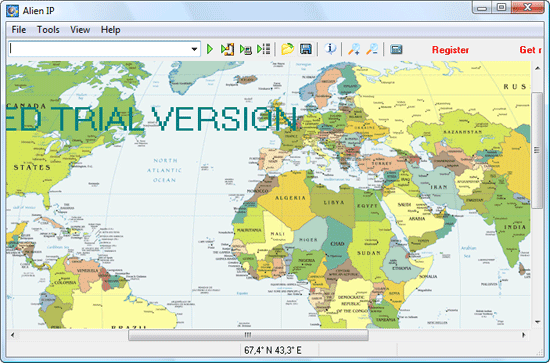
We can click on the map to center it, or use scroll bars. As we move mouse pointer over the map, exact coordinates of the place under the pointer are shown in the status bar (below). Capitals and most important cities are shown on the map. If we place the mouse pointer over some populated area, we will also be able to see names of smaller cities in the area (in the status bar).
It is possible to zoom in for a better look.
Now let's enter some domain name to find out where the server is situated physically.
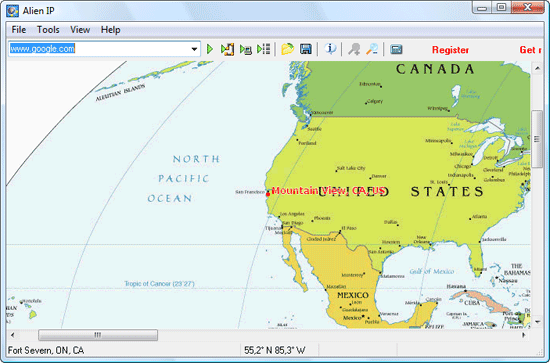
The location is highlighted on the map with a red dot, followed by the name of the place.
Alien IP automatically resolves hostnames to IP addresses.
However, most computers on the internet don't have any domain names associated with them, like personal computers. But they do have their unique IP addresses that can be extracted from email headers, server logs etc.
Alien IP accepts IP addresses as readily as hostnames:
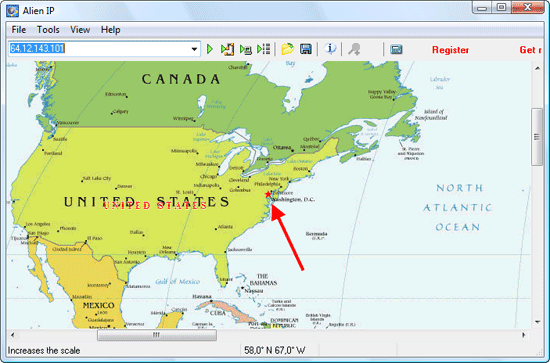
The program can be used to batch-process server logs and other lists of IP addresses, which help visualizing information about visitors. It also contains a number of network tools, like ping, traceroute etc. Helpful for webmasters and for everybody who wants to learn more about networks.
 Product Page
- Firewall and Intrusion Detection
- Network/Protocol Analyzer
- Network Scanner
- Privacy and Anonymity
- Whois and TraceRoute
- Network Utilities, Suits, Toolkits
- Network Monitor
- Network Traffic Accounting
- Network Inventory
- Remote Control
- File and Disk Encryption
- File and Password Recovery
- Keylogger and AntiKeylogger
- Email Tools
All Categories
Best Recent Downloads
-
PA Server Monitor Ultra
Agentless distributed monitoring of servers and devices
-
GFI WebMonitor - Standalone Proxy Version
Internet monitoring and web security for SMBs
-
GFI LANguard Network Security Scanner
Network vulnerability management solution.
-
Nsauditor Network Security Auditor
Scan and monitor network.Over 45 net tools.
-
10-Strike Network Inventory Explorer
Monitor network computer inventory
-
Network Administrator's Toolkit
Inventory user PCs and monitor servers
-
Net Monitor for Employees
See their screens and take a control.
-
SpotAuditor
Recovers MSN,IE,Outlook,ICQ,Ras,Ftp passwords
-
Alchemy Eye
Server monitoring tool
-
NetResident
Network content monitor
-
Advanced Host Monitor
Award-winning network monitoring software
-
Network Inventory Reporter
inventory software
-
SpotIE Password Recovery
SpotIE recovers Internet Explorer passwords.
-
Asset Tracker for Networks
Inventory network workstations, build reports
-
SpotMSN Password Recover
Recovers MSN messenger and Live passwords.
-
Accent OFFICE Password Recovery
How to break passwords in Office / OpenOffice
-
East-Tec Eraser 2008
Keep what you do on your computer to yourself
-
Security Task Manager
Enhanced Process Viewer that protects your PC
-
NetInfo
A full-featured network toolkit.
-
SpotFTP Password Recover
Recovers FTP passwords stored in computers.
-
Free IP Scanner
A very fast IP scanner and port scanner.