
Article: How to monitor server availability?
Introduction.
Some network services need to be active constantly, day and night. Web-servers, email servers, routers, access points are examples of such. A company of any size can greatly depend on properly running network services, or it starts losing money.
But check each and every service manually is extremely boring and ineffective. For example, a web-server runs for months without a single failure, and then it crashes one night. How long will it take before you discover that manually?
Alchemy Eye is a highly customizable tool for monitoring server and network availability. It can check server availability as often as needed. If a problem is detected, the tool can notify you by email, instant messaging, SMS, or by other means.
Step 1: Download and install the program.
Download Alchemy Eye to a known location on your computer. Run the downloaded setup package and follow on-screen instructions to install it.
Step 2: Start the program. Add a monitor.
Launch Alchemy Eye. The main window appears. It is empty, as no monitors have been added yet.
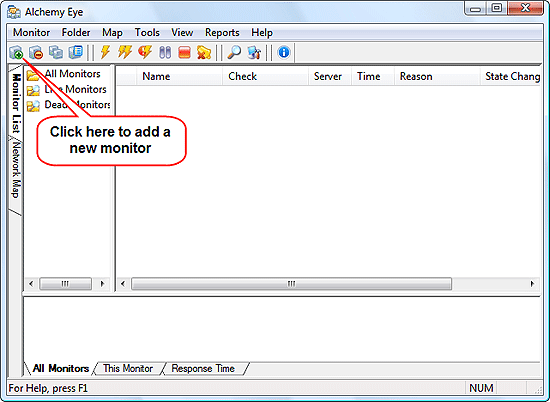
Click the leftmost button on the toolbar to add a new monitor. This will open the following window:
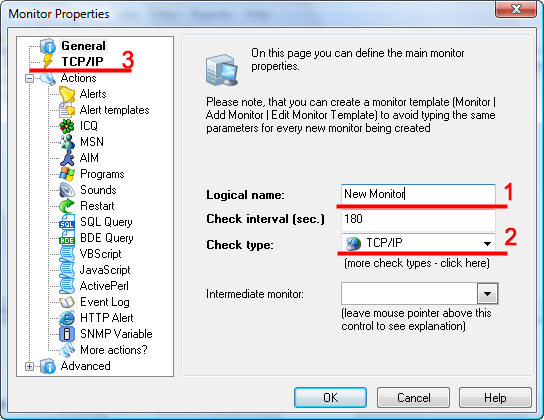
You can set name for your monitor to easily distinguish it between others (if you intend to monitor multiple servers/devices) (1). Below the name, there is a "Check interval" field that specifies how often the service should be checked. By default it offers us 3 minutes intervals, which is okay.
As next, specify the type of service that you want to monitor (2). We intend to keep an eye on our web-server, so we set TCP/IP here. Other possible types can be picked up in the dropdown list:
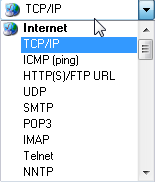
Alchemy Eye supports virtually all known network services and methods of monitoring. Scroll down the list to see more, if you need.
Finally, you can specify an intermediate monitor here. This may be useful, if, for example, you need to monitor a server on the internet, and you access the internet through a number of intermediate devices. If one of the devices is down, Alchemy Eye may mistakenly report a server failure.
As you select a "check type" from the list (2), a new item is added in the list (3). Click it to set other options.
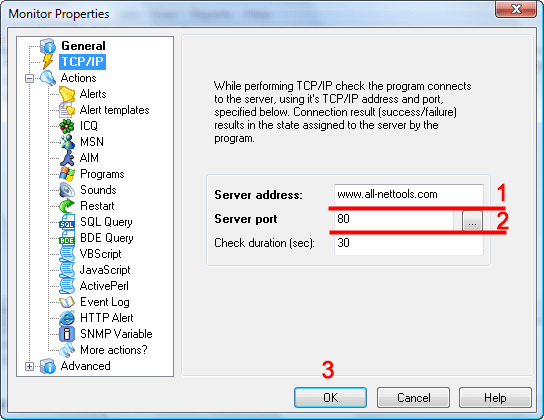
For a web-server, simply enter its address (either IP or domain name) (1) and its port (2). You can simply select predefined ports by clicking the '...' button on the right.
Finally, click "OK" to add the new monitor.
Step 3: Check server availability.
Our monitor will check server availability every three minutes. To check it
right now, we select the monitor and click this button on the toolbar:

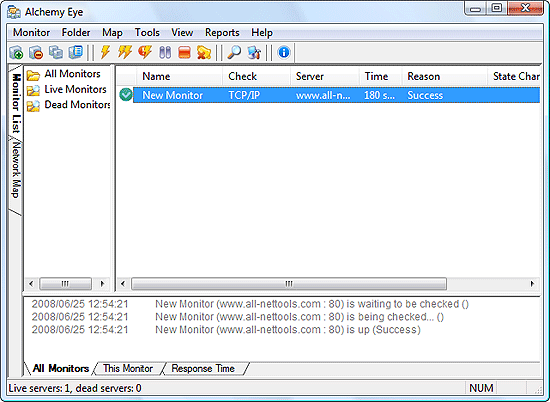
Alchemy Eye reports that our server is up and running, no problems detected. Now we can minimize the program to tray and let it monitor our server constantly. However, it may be a good idea to set notifications, alarms, and other options first. This can be done by editing monitor's properties (see the list of actions on the screen shots from step 2).
 Product Page
- Firewall and Intrusion Detection
- Network/Protocol Analyzer
- Network Scanner
- Privacy and Anonymity
- Whois and TraceRoute
- Network Utilities, Suits, Toolkits
- Network Monitor
- Network Traffic Accounting
- Network Inventory
- Remote Control
- File and Disk Encryption
- File and Password Recovery
- Keylogger and AntiKeylogger
- Email Tools
All Categories
Best Recent Downloads
-
PA Server Monitor Ultra
Agentless distributed monitoring of servers and devices
-
GFI WebMonitor - Standalone Proxy Version
Internet monitoring and web security for SMBs
-
GFI LANguard Network Security Scanner
Network vulnerability management solution.
-
Nsauditor Network Security Auditor
Scan and monitor network.Over 45 net tools.
-
10-Strike Network Inventory Explorer
Monitor network computer inventory
-
Network Administrator's Toolkit
Inventory user PCs and monitor servers
-
Net Monitor for Employees
See their screens and take a control.
-
SpotAuditor
Recovers MSN,IE,Outlook,ICQ,Ras,Ftp passwords
-
Alchemy Eye
Server monitoring tool
-
NetResident
Network content monitor
-
Advanced Host Monitor
Award-winning network monitoring software
-
Network Inventory Reporter
inventory software
-
SpotIE Password Recovery
SpotIE recovers Internet Explorer passwords.
-
Asset Tracker for Networks
Inventory network workstations, build reports
-
SpotMSN Password Recover
Recovers MSN messenger and Live passwords.
-
Accent OFFICE Password Recovery
How to break passwords in Office / OpenOffice
-
East-Tec Eraser 2008
Keep what you do on your computer to yourself
-
Security Task Manager
Enhanced Process Viewer that protects your PC
-
NetInfo
A full-featured network toolkit.
-
SpotFTP Password Recover
Recovers FTP passwords stored in computers.
-
Free IP Scanner
A very fast IP scanner and port scanner.