
Article: How to remove spyware?
Introduction.
Spyware is a general term for different types of unwanted software that installs itself on our computers and starts doing things that we don't quite appreciate. We can include into this category adware, keyloggers, trojans, and other types of malicious software. Usually spyware doesn't reveal itself, i.e. it doesn't show up as a running program. With adware programs, you can know that something is wrong if you get unexpected popups with commercials, or if your computer starts running slower than usual. Unfortunately, some spyware is not that harmless. For example, keyloggers may collect everything you type and send it to other people over the internet.
To detect and remove spyware programs on your computer, you can use Anti-Spy.Info adware remover.
Step 1: Download and install the program.
Download Anti-Spy.Info adware remover to a known location. Run the setup and follow on-screen instructions to install the application.
Step 2: Start the program. Let it scan processes on your system.
Launch Anti-Spy.Info. The trial version is fully functional during its evaluation period:
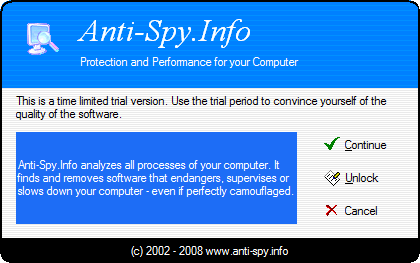
Click "Continue" to get to the main window.
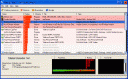
The program automatically starts scanning processes on your system. It also analyzes behavior of each process and decides how dangerous the process can be. Results of this analysis are shown in the "Rating" column. Higher rating means more dangerous (potentially).
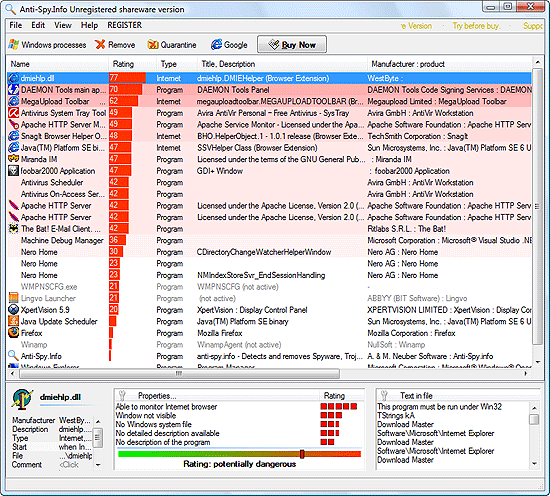
Step 3: Detect and remove spyware.
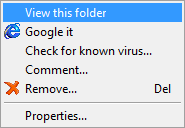
However, a high rating doesn't always mean that the program is spyware. It may simply have some properties of spyware, but nevertheless be a harmless (or is it better to say useful?) application. If you don't know what a particular process is for, and it is shown as potentially dangerous, you can easily get all necessary information. Just pick out the process from the list and click "Google" on the toolbar. Alternatively, right-click the process and select "Google it" from the context menu:
It will open a details page in your default browser. For example:
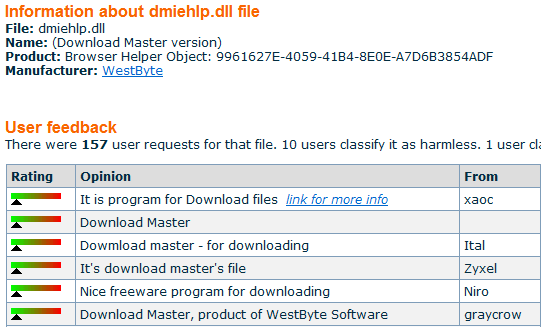
Now the mysterious process 'dmiehlp.dll' doesn't look so bad. We learn that it's simply a part of Download Master. The latter is a download manager that is, indeed, installed on our system.
Thus, the program highlights processes that can be dangerous, and if you have doubts about any of them, it is possible to check their meaning on the internet. Dangerous processes can be immediately stopped and removed from the system. If you believe that a particular process can be a useful program that you know nothing about, you can quarantine it and see how your system works without it.
Anti-Spy.Info is a perfect tool for detecting and removing zero-day viruses, adware, spyware, and other types of malicious software. It also helps the user find and remove unimportant processes and so improve the overall performance.
 Product Page
- Firewall and Intrusion Detection
- Network/Protocol Analyzer
- Network Scanner
- Privacy and Anonymity
- Whois and TraceRoute
- Network Utilities, Suits, Toolkits
- Network Monitor
- Network Traffic Accounting
- Network Inventory
- Remote Control
- File and Disk Encryption
- File and Password Recovery
- Keylogger and AntiKeylogger
- Email Tools
All Categories
Best Recent Downloads
-
PA Server Monitor Ultra
Agentless distributed monitoring of servers and devices
-
GFI WebMonitor - Standalone Proxy Version
Internet monitoring and web security for SMBs
-
GFI LANguard Network Security Scanner
Network vulnerability management solution.
-
Nsauditor Network Security Auditor
Scan and monitor network.Over 45 net tools.
-
10-Strike Network Inventory Explorer
Monitor network computer inventory
-
Network Administrator's Toolkit
Inventory user PCs and monitor servers
-
Net Monitor for Employees
See their screens and take a control.
-
SpotAuditor
Recovers MSN,IE,Outlook,ICQ,Ras,Ftp passwords
-
Alchemy Eye
Server monitoring tool
-
NetResident
Network content monitor
-
Advanced Host Monitor
Award-winning network monitoring software
-
Network Inventory Reporter
inventory software
-
SpotIE Password Recovery
SpotIE recovers Internet Explorer passwords.
-
Asset Tracker for Networks
Inventory network workstations, build reports
-
SpotMSN Password Recover
Recovers MSN messenger and Live passwords.
-
Accent OFFICE Password Recovery
How to break passwords in Office / OpenOffice
-
East-Tec Eraser 2008
Keep what you do on your computer to yourself
-
Security Task Manager
Enhanced Process Viewer that protects your PC
-
NetInfo
A full-featured network toolkit.
-
SpotFTP Password Recover
Recovers FTP passwords stored in computers.
-
Free IP Scanner
A very fast IP scanner and port scanner.