
Article: How to monitor other users' activities?
Introduction.
Would you like to know what other users do with your computer in your absense?
All activities on a given computer can be logged with a program like SpyMyPC PRO. This tool is an advanced keylogger, which means that it captures all keystrokes and saves them to a special file (log). The program works in the background and isn't visible to the user. It doesn't show up itself in Windows Task Manager, in Windows Start Menu, in the Add/Remove software dialog. You can make it visible only by pressing a secret combination of keys.
SpyMyPC PRO records everything that is typed on your computer, logs visited internet pages, started programs, chatting, and other activities.
Step 1: Download and install the program.
Download SpyMyPC PRO to a known location. Run setup and follow on-screen instructions to install the application.
Step 2: Start the program. Spy on other users.
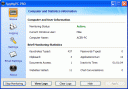
Launch SpyMyPC PRO. The main window will be shown.
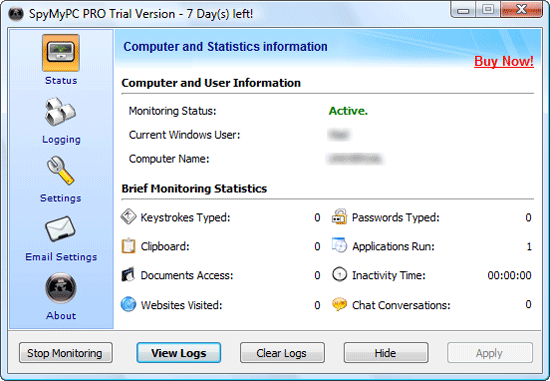
Here you can review details about the monitoring status, current user, computer name, and some basic statistics. To set up the program, click "Settings" on the left.
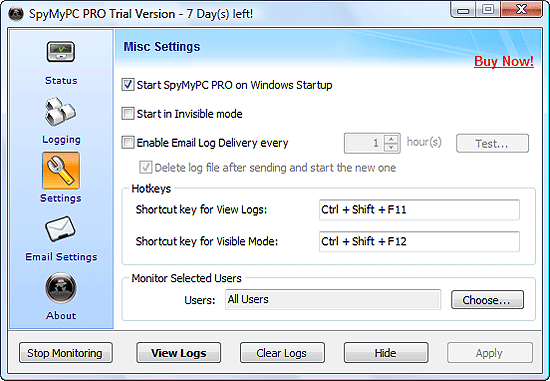
On this page, it is possible to set up monitoring for only a group of users, or for a single user. By default, SpyMyPC PRO monitors all users.
Other settings include starting in invisible mode, starting on Windows Startup, emailing logs every given time. To set up emailing, click "Email Settings" on the left.
Once you send the program into the invisible mode, it can be made visible only by pressing a secret combination of keys. Choose these combinations in the "Hotkeys" area.
As next, specify what you want to be logged. Click "Logging" on the left to get the following:
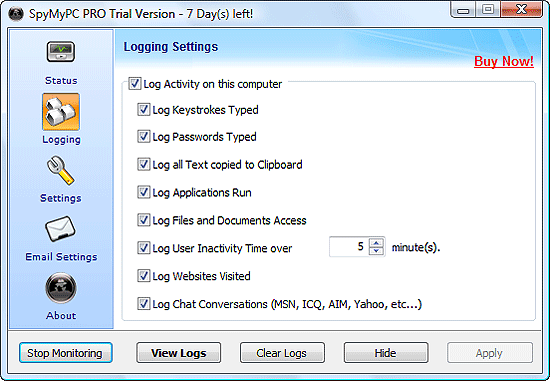
As you see, the program can log every keystroke typed, including passwords, log clipboard contents, record what applications are launched, files and documents access, user inactivity, visited websites, chatting. Every service can be switched on or off, depending on your wishes and on what is important for you to capture.
Monitoring can be started and stopped by clicking on the leftmost button in the lower part of the window.
Click "Hide" to hide SpyMyPC PRO and let it monitor all activities in the background.
To view logs, call the main window (for example, by pressing the specified hotkeys) and click "View Logs" in the lower part of the window. Alternatively, use the key combination specified earlier.
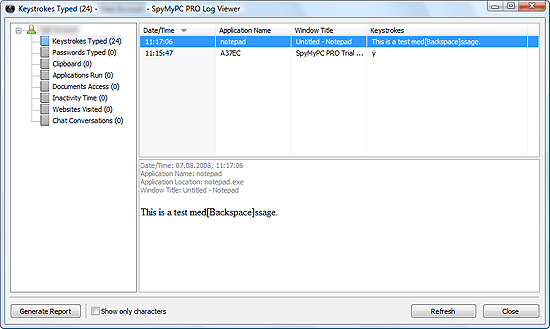
SpyMyPC PRO sorts all logged activities by their type. Keystrokes are logged with information about what application they are sent to. This allows keeping every detail of what is happening on the computer.
The trial version of SpyMyPC PRO cannot be sent into the invisible mode. To remove this limitation, you should register your copy of the program.
 Product Page
- Firewall and Intrusion Detection
- Network/Protocol Analyzer
- Network Scanner
- Privacy and Anonymity
- Whois and TraceRoute
- Network Utilities, Suits, Toolkits
- Network Monitor
- Network Traffic Accounting
- Network Inventory
- Remote Control
- File and Disk Encryption
- File and Password Recovery
- Keylogger and AntiKeylogger
- Email Tools
All Categories
Best Recent Downloads
-
PA Server Monitor Ultra
Agentless distributed monitoring of servers and devices
-
GFI WebMonitor - Standalone Proxy Version
Internet monitoring and web security for SMBs
-
GFI LANguard Network Security Scanner
Network vulnerability management solution.
-
Nsauditor Network Security Auditor
Scan and monitor network.Over 45 net tools.
-
10-Strike Network Inventory Explorer
Monitor network computer inventory
-
Network Administrator's Toolkit
Inventory user PCs and monitor servers
-
Net Monitor for Employees
See their screens and take a control.
-
SpotAuditor
Recovers MSN,IE,Outlook,ICQ,Ras,Ftp passwords
-
Alchemy Eye
Server monitoring tool
-
NetResident
Network content monitor
-
Advanced Host Monitor
Award-winning network monitoring software
-
Network Inventory Reporter
inventory software
-
SpotIE Password Recovery
SpotIE recovers Internet Explorer passwords.
-
Asset Tracker for Networks
Inventory network workstations, build reports
-
SpotMSN Password Recover
Recovers MSN messenger and Live passwords.
-
Accent OFFICE Password Recovery
How to break passwords in Office / OpenOffice
-
East-Tec Eraser 2008
Keep what you do on your computer to yourself
-
Security Task Manager
Enhanced Process Viewer that protects your PC
-
NetInfo
A full-featured network toolkit.
-
SpotFTP Password Recover
Recovers FTP passwords stored in computers.
-
Free IP Scanner
A very fast IP scanner and port scanner.